
System Administrator
One administration layer for every module.
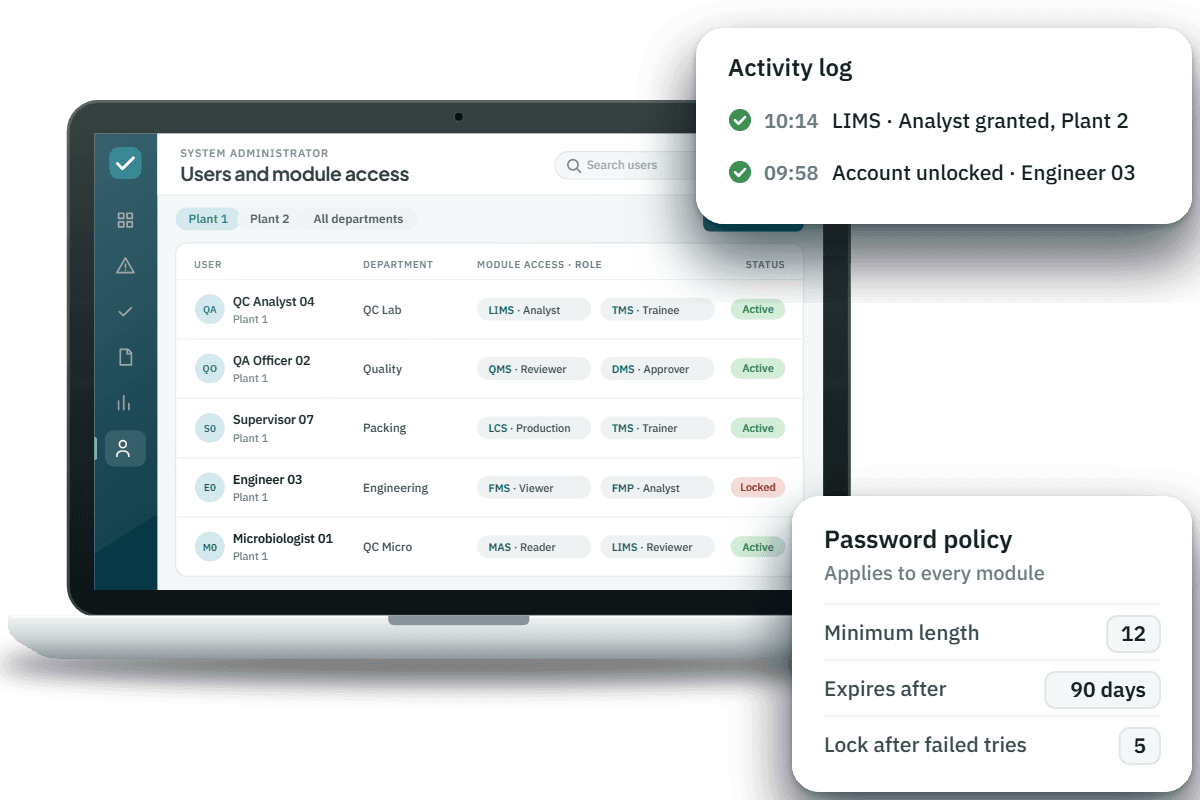
The single place your IT team manages people and structure across the whole suite. Create and maintain users, plants, departments and designations; grant a user access to a module across the plants they cover; assign the role they hold in it; and set password policy centrally.
 AsepticOne
Its Aseptic Intervention Compliance System, Aseptic Controlled Authorization System and Line Clearance System are administered here too — the same users, roles and password policy as the rest of the suite.
Back to AsepticOneOverview
What is System Administrator?
Every platform in the suite needs the same things set up before anyone can use it: who exists, which plant and department they belong to, which modules they may open, and the role they hold in each. Run that separately per platform and a joiner needs four accounts, a leaver four removals, and a password reset four tickets.
System Administrator is the one place that work happens for all four platforms. Your IT team sets a person up once, and single sign-on carries them into every module their role allows.
Built for: IT administrators and system owners who run user and access administration for regulated sites.
Suite stack
4 platformsWhy it exists
What this replaces
Every system that keeps its own user list keeps its own idea of who works here, and the lists drift apart.
Run system by system
Run on System Administrator
Where it plugs in
One login, every platform
The same administration runs under each platform below, and under every module listed on its card.
 ComplianceOne
The integrated compliance suite for GxP-regulated operations — quality, documents, training and access connected in one closed loop, with single sign-on across every module.
ComplianceOne overview FacilityOne
Environmental monitoring, mapping and microbial air sampling — validation studies, viable air monitoring and 24/7 oversight of cold rooms, cleanrooms, warehouses, and transport.
FacilityOne overviewAsepticOneDigitalised aseptic operations — controlled authorisation, intervention documentation and line clearance, integrated and traceable.
AsepticOne overview LabOne
A LIMS for pharmaceutical quality control — samples, specifications, analysis, stability, instruments, reagents and microbiology in one system, with every result traceable to the analyst, instrument and standard behind it.
LabOne overviewWhat it includes
Set once, for the whole suite
Roles and their access rights are defined within each module; System Administrator assigns them.
- Create, edit and manage users, plants, departments and designations
- Grant module access per user, across as many plants as the role covers
- Assign the role a user holds in each module they are given
- Password configuration and policy set centrally
- Password reset for locked accounts across our software
- Activity log and audit trail for every administrative action
- Exportable compliance reports and dashboards
- Extends automatically to every module added to the suite
Standards
Built against the frameworks you are held to
- 21 CFR Part 11
- EU Annex 11
- EU Annex 1
- GAMP 5
- ALCOA++
- WHO GDP
- GMP
- ISO/IEC 17025
Deployment
User and access records, where your policy requires them
Cloud
Hosted, patched and monitored by GAMP. Nothing for your IT team to run.
On-premises
Inside your own data centre, so user accounts and access records never leave infrastructure you control.
Hybrid
Application and data split to match your residency policy.
Benefits
What System Administrator gives you
Ready on day one
A new starter is set up once and can open every module their role needs, at each plant it covers, from their first sign-in.
Gone everywhere at once
Removing someone in one place removes them from every GAMP module, so no forgotten account outlives their last day.
One reset, not four
A locked-out user is unlocked once, instead of once per platform.
Evidence on request
Compliance reports and dashboards export from the same place, so an access review starts from one record.
FAQs
Questions teams ask before they start
Does it replace User Access Management (UAM)?
No. System Administrator manages users of the GAMP suite itself — who can open which module, with what role. UAM is a ComplianceOne module that manages access requests for your other GxP systems, instruments and equipment.
Can one person hold different roles in different modules?
Yes. Module access and the role held in it are granted per module, so a person can be, for example, an approver in QMS and a requester only in UAM.
Does it work across multiple plants?
Yes. Module access is granted per user across as many plants as their role covers, so one person’s access can span several sites without a separate account at each.
Where can it be deployed?
In the cloud, on-premises or as a hybrid. In the cloud, GAMP hosts, patches and monitors it. On-premises, it runs inside your own data centre. A hybrid splits application and data to match your residency policy.
Is it compliant with 21 CFR Part 11 and EU Annex 11?
It provides the technical controls both regulations require: unique logins, a secure computer-generated audit trail on every action, e-signatures that record who signed, when and what the signature means, and role-based access on every record. Compliance also depends on how the system is validated and used at your site.
Which regulations and standards is it built against?
EU Annex 11 and 21 CFR Part 11 for electronic records and signatures; GMP, including EU GMP Annex 1 for sterile manufacture; WHO GDP for storage and distribution; GAMP 5 for the validation approach; ALCOA++ for data integrity; and ISO/IEC 17025 for calibration.
Can we see it against our own process?
Yes. Bring the workflow you run today and we will walk the modules through it, rather than through a scripted demo, and be straight about what would need to change on both sides.
Does it extend to modules added later?
Yes. The administration layer extends automatically to every module added to the suite.