
Document Management System
The entire document lifecycle with version control, e-signatures, and complete traceability from creation to archival.
Download the DMS product sheet (PDF, 156 KB)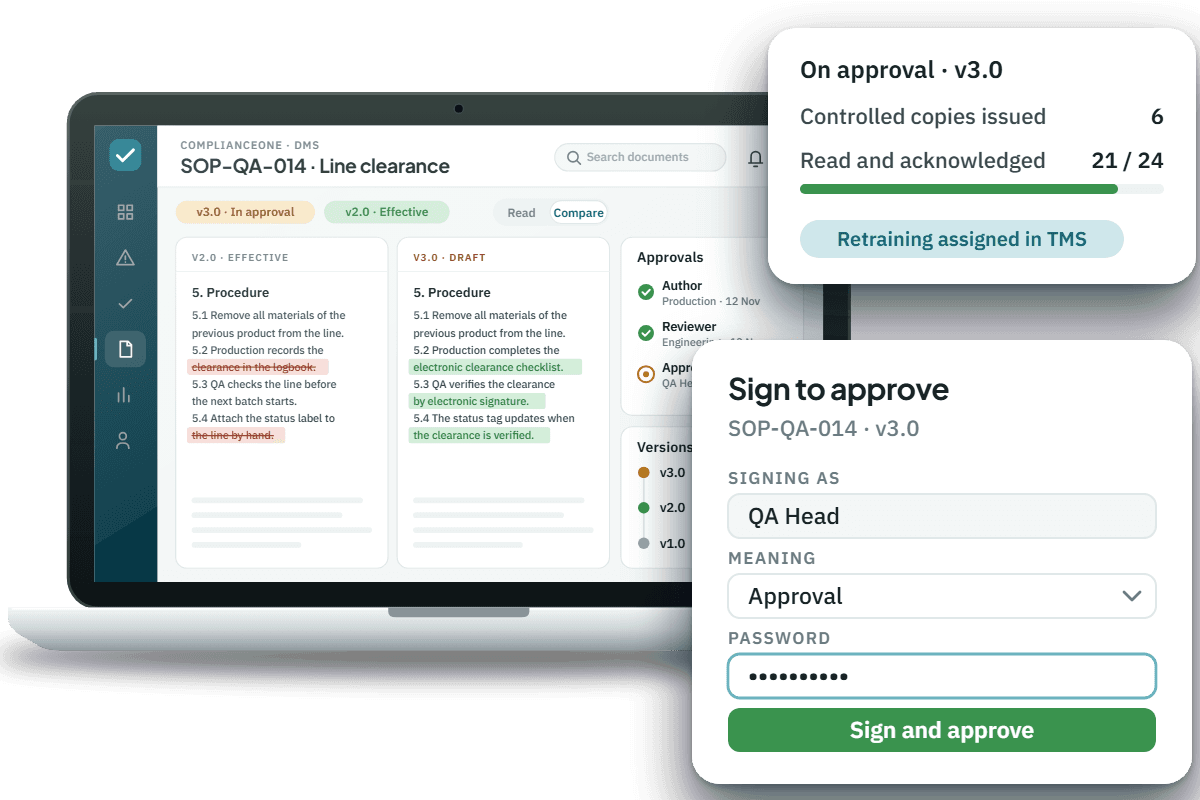
Overview
Why document control matters
SOPs tell people how to do their jobs. Batch manufacturing and packing records (BMR/BPR) prove the job was done properly. Protocols show that equipment and processes were qualified. If an old version of any of these stays in use, product is being made to the wrong instructions.
On paper, document control depends on people remembering to pull back old copies, number new ones, collect signatures and update the master list. GAMP DMS handles those steps in the system. People still write, review and approve; they no longer have to keep track of everything by hand.
Is the copy on the floor the current version?
In GAMP DMS:
- Drafted: From an approved template
- Compared: Side by side with the current version
- Approved: By electronic signature
- Issued: Controlled copies, acknowledgement tracked
- Retraining: Assigned to the roles that work to it
The next revision starts the cycle again
Why GAMP
Why teams choose GAMP DMS
Author from a controlled template
SOPs start from an approved template, and any two revisions can be compared side by side rather than read in parallel.
GAMP DMS · in this workflow
- Template-based SOP creation
- Side-by-side document compare
Know what people actually hold
Controlled issuance of SOPs, batch records and protocols, with transfer and acknowledgement tracked — so the copy in someone’s hand is the current one.
GAMP DMS · in this workflow
- Controlled issuance of SOPs, BMR/BPR, protocols
- Transfer and acknowledgement tracking
Rights that match the role
Transcription managed within the system, and view, edit and approve rights granted by role rather than by convention.
GAMP DMS · in this workflow
- Transcription management
- Role-based view, edit, and approve rights
Where it sits
One module of ComplianceOne
Every ComplianceOne module is integrated — single sign-on, one administration layer and closed-loop compliance — so a record made here can reference records made next door.
ComplianceOne · 4 modules
You are here
System AdministratorCORE
The layer under every ComplianceOne module, and under the rest of the suite too.
- 21 CFR Part 11
- EU Annex 11
- EU Annex 1
- GAMP 5
- ALCOA++
- WHO GDP
- GMP
- ISO/IEC 17025
Benefits
What GAMP DMS gives you
Across ComplianceOne
Closed-loop compliance
A deviation, the CAPA it raises and the retraining that follows all reference each other. Nothing is re-keyed into a second system, and nothing has to be joined up later.
Administered once
Users, plants, departments and password policy for QMS, DMS, TMS and UAM are managed in one place, and so is any module added later.
The right version on the floor
Issued copies are tracked to the person holding them, so you can show who has the current version and when they acknowledged it.
Changes a reviewer can see
Authoring from an approved template and comparing any two revisions side by side shows exactly what changed, and nothing else.
Rights by role, not by habit
View, edit and approve rights follow the role, so nobody can approve a document they should only read.
Batch records under the same control
BMR, BPR and protocols are issued and controlled the same way as SOPs, so a batch is made to the current record.
Approval that starts retraining
A document is approved by electronic signature, and the approval assigns retraining in TMS to the roles that work to it.
Transcription kept in the system
Transcription is managed within the system rather than by hand outside it.
FAQs
Questions teams ask before they start
What does it control across a document’s life?
The entire lifecycle, from creation to archival, with version control, e-signatures and full traceability. It includes template-based SOP creation, side-by-side document compare and controlled issuance of SOPs, BMR/BPR and protocols.
Which documents can the DMS control?
SOPs, work instructions, specifications, batch manufacturing and packing records, validation protocols and reports, policies, forms and formats.
Can we still use printed copies?
Yes. Most plants still need paper on the shop floor. The DMS issues numbered controlled copies, records who holds them, and reconciles them when they come back.
How do we stop an obsolete SOP being used?
Once a new version is effective, the old one is marked superseded in the system and issued copies of it are flagged for retrieval.
How are electronic signatures applied?
The signer re-enters their credentials at the moment of signing. The signature shows their name, the date and time, and its meaning, such as “reviewed” or “approved”, as 21 CFR Part 11 requires.
Can we import our existing SOPs?
Yes. Current documents are migrated during implementation with their numbers and version history.
Is it compliant with 21 CFR Part 11 and EU Annex 11?
It provides the technical controls both regulations require: unique logins, a secure computer-generated audit trail on every action, e-signatures that record who signed, when and what the signature means, and role-based access on every record. Compliance also depends on how the system is validated and used at your site.
Which regulations and standards is it built against?
EU Annex 11 and 21 CFR Part 11 for electronic records and signatures; GMP, including EU GMP Annex 1 for sterile manufacture; WHO GDP for storage and distribution; GAMP 5 for the validation approach; ALCOA++ for data integrity; and ISO/IEC 17025 for calibration.
Where can it be deployed?
In the cloud, on-premises or as a hybrid. In the cloud, GAMP hosts, patches and monitors it. On-premises, it runs inside your own data centre. A hybrid splits application and data to match your residency policy.
Who manages users and access?
Your IT team does, through System Administrator: users, plants, departments and designations, module access per user, the role a user holds in each module, and password policy, all set once for the whole suite.
Can we see it against our own process?
Yes. Bring the workflow you run today and we will walk the modules through it, rather than through a scripted demo, and be straight about what would need to change on both sides.
Does it extend to modules added later?
Yes. The administration layer extends automatically to every module added to the suite.