
ComplianceOne
One Platform. Total Compliance.
The integrated compliance suite for GxP-regulated operations — quality, documents, training and access connected in one closed loop, with single sign-on across every module.
Overview
What is ComplianceOne?
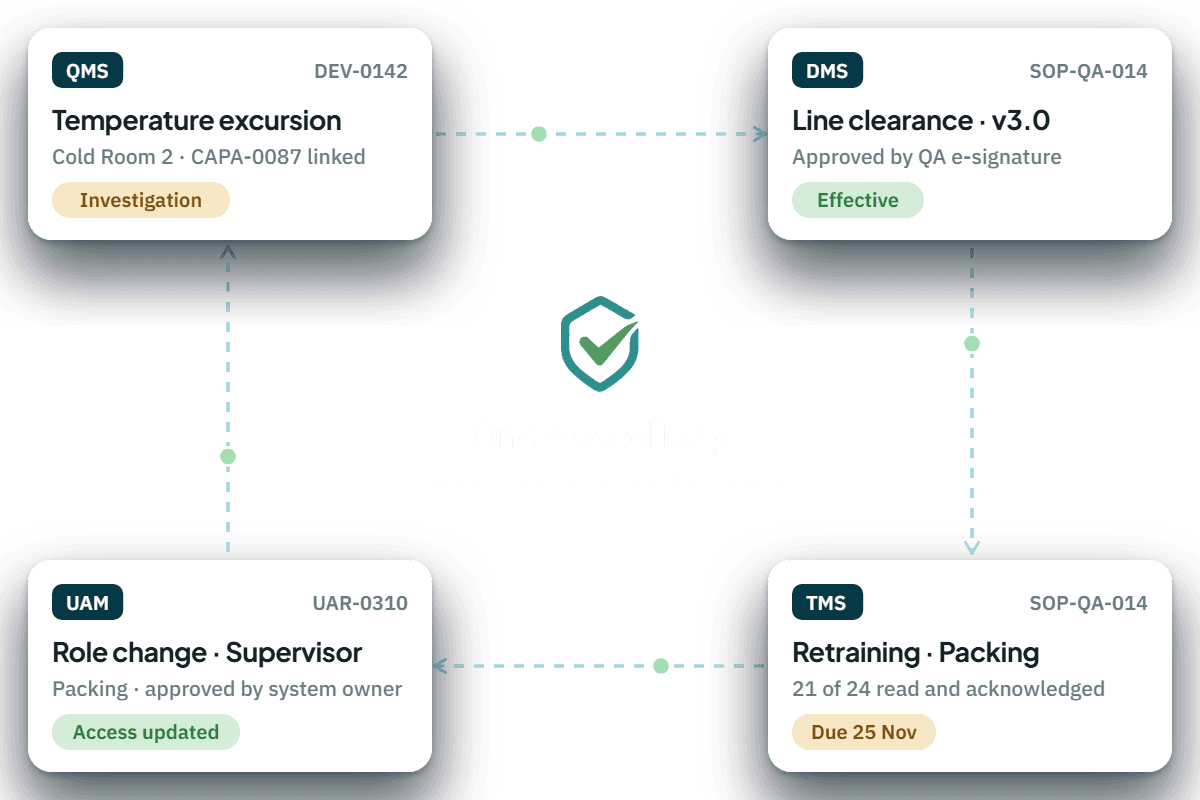
ComplianceOne is GAMP Lifetech’s integrated compliance suite for GxP-regulated operations. Quality events, controlled documents, training and system access live in one platform instead of four disconnected tools.
The modules are integrated: single sign-on, one administration layer and closed-loop compliance. A deviation, the SOP it changes and the training that follows are connected records, not separate files.
Built for: Quality, QA, IT and training teams in pharmaceutical and life-science manufacturing.
Module stack
4 modulesWhy it exists
What this replaces
Most of the plants we work in are not short of process. They are short of a system that holds the process together.
Run on paper
Run on ComplianceOne
What’s inside
The modules, and what each one does
Quality Management System
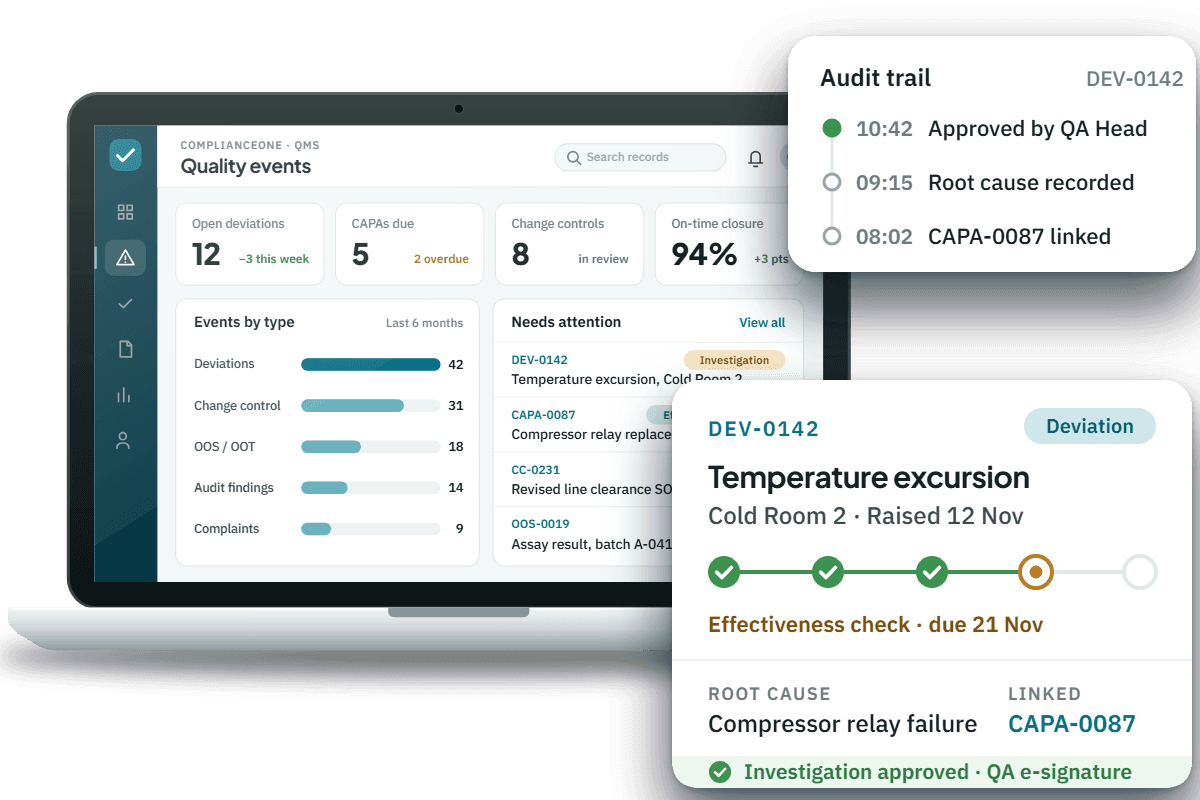
Deviations, CAPA, change control, audits, and risk in a closed loop — every quality event connected, investigated, and closed.
CapabilitiesQMS · Capabilities
- Deviation handling with root cause analysis
- CAPA with effectiveness checks
- Change control and impact assessment
- Internal and external audit management
- Risk assessment, OOS/OOT, market complaints
- Vendor qualification and oversight
Document Management System
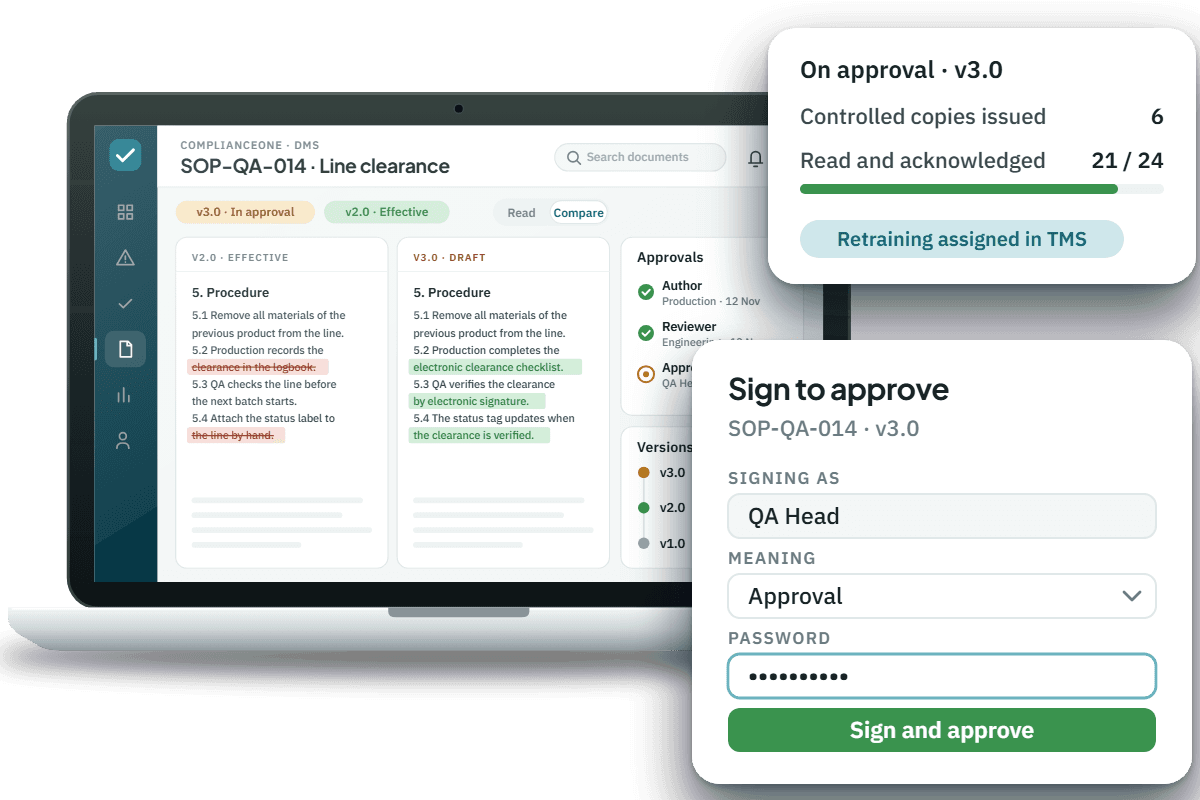
The entire document lifecycle with version control, e-signatures, and complete traceability from creation to archival.
CapabilitiesDMS · Capabilities
- Template-based SOP creation
- Side-by-side document compare
- Controlled issuance of SOPs, BMR/BPR, protocols
- Transfer and acknowledgement tracking
- Transcription management
- Role-based view, edit, and approve rights
Training Management System
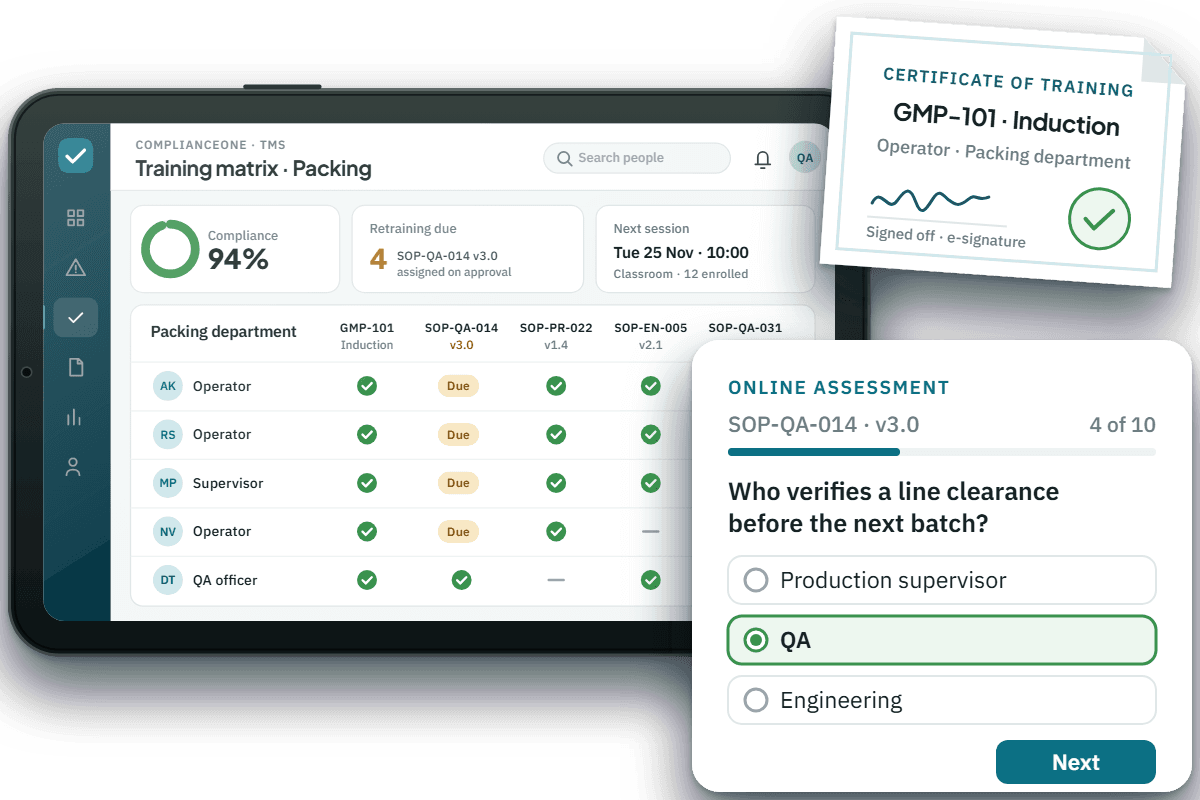
The complete training lifecycle from induction to certification, with SOP changes triggering retraining automatically.
CapabilitiesTMS · Capabilities
- Digitised onboarding and induction
- Auto-sync with approved documents
- Course code management by role and department
- Session scheduling with attendance tracking
- Online assessments and competency tracking
- On-the-job training with e-signatures
- Centralised training records and certificates
User Access Management
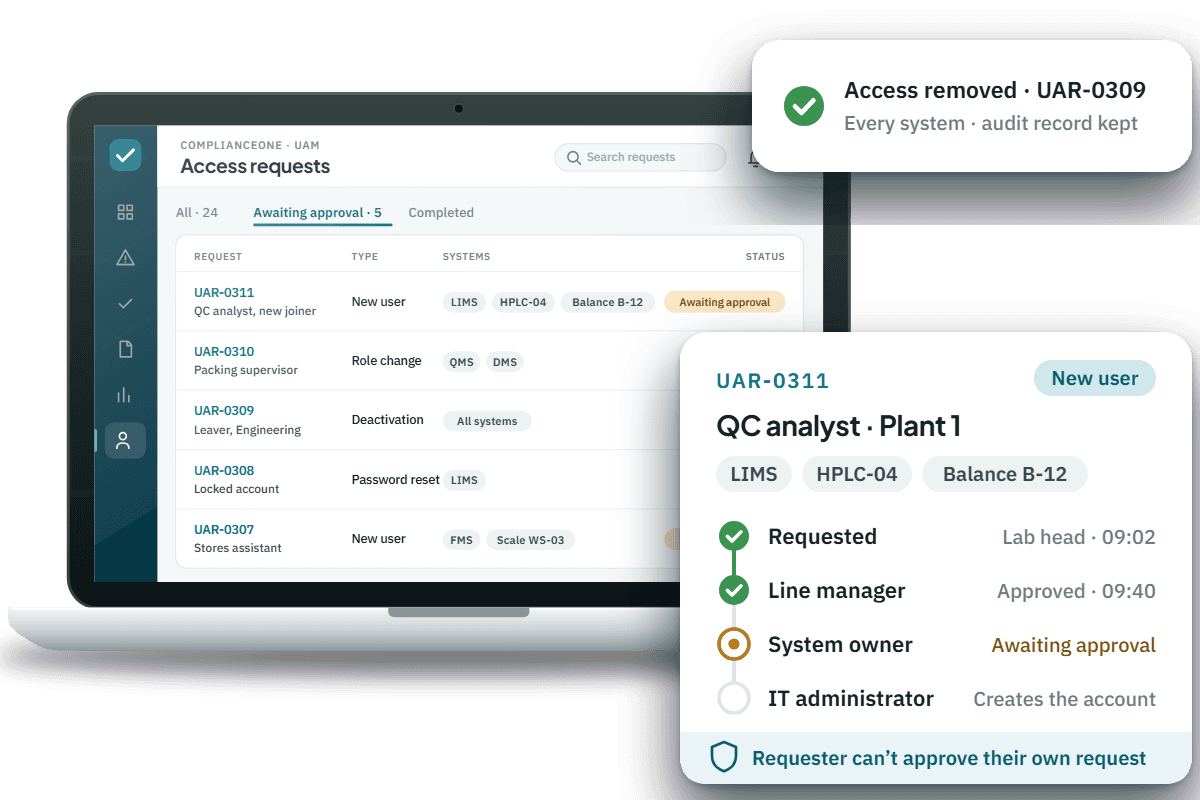
Replaces the paper access-request form. Creation, modification, deactivation, password reset and account recovery for users of your systems, instruments and equipment — every request routed, approved and recorded.
CapabilitiesUAM · Capabilities
- Digitised user creation for any system, instrument or equipment
- One submission covering requests across multiple systems
- Access modification — role changes routed for approval
- User deactivation with a complete audit record
- Password reset and account recovery requests
- Segregation of duties and access rights enforced for data integrity
Shared across the suite
System Administrator
One set of users for QMS, DMS, TMS and UAM
Everyone who raises, reviews or approves a quality record is created once, with the plants they cover and the role they hold in each module.
- QMS, DMS, TMS and UAM access granted per user, plant by plant
- A different role in each module: an author in DMS can be an approver in QMS
- Departments and designations defined once for all four modules
- A locked account reset once, not module by module
Standards
Built against the frameworks you are held to
- 21 CFR Part 11
- EU Annex 11
- EU Annex 1
- GAMP 5
- ALCOA++
- WHO GDP
- GMP
- ISO/IEC 17025
Deployment
Quality records, where your policy requires them
Cloud
Hosted, patched and monitored by GAMP. Nothing for your IT team to run.
On-premises
Inside your own data centre, so quality records never leave infrastructure you control.
Hybrid
Application and data split to match your residency policy.
Benefits
What ComplianceOne gives you
Closed-loop compliance
A deviation, the CAPA it raises and the retraining that follows all reference each other. Nothing is re-keyed into a second system, and nothing has to be joined up later.
Inspection-ready by default
Audit trails, electronic signatures and access control are built into every module, not switched on when an inspection is announced.
Administered once
Users, plants, departments and password policy are managed in one place across every module — and every module added later.
Deployed to your policy
Cloud, on-premises or hybrid. The compliance controls work the same way whichever you choose.
FAQs
Questions teams ask before they start
Can we buy one module and add the others later?
Yes. Each module works on its own. When you add another, it joins the same users, single sign-on and administration layer, so it goes live on settings that already exist.
Can we bring in our existing SOPs and training records?
Yes. Existing documents and historical training records are migrated during implementation, so the system starts from your current state rather than from empty.
Can we see it against our own process?
Yes. Bring the workflow you run today and we will walk the modules through it, rather than through a scripted demo, and be straight about what would need to change on both sides.
Does it extend to modules added later?
Yes. The administration layer extends automatically to every module added to the suite.
Does it support multiple plants?
Yes. Users, departments and access are set up plant by plant, and one person can hold roles at several sites — granted per plant, exactly as far as their job reaches.
Where can it be deployed?
In the cloud, on-premises or as a hybrid. In the cloud, GAMP hosts, patches and monitors it. On-premises, it runs inside your own data centre. A hybrid splits application and data to match your residency policy.
Who manages users and access?
Your IT team does, through System Administrator: users, plants, departments and designations, module access per user, the role a user holds in each module, and password policy, all set once for the whole suite.
Is it compliant with 21 CFR Part 11 and EU Annex 11?
It provides the technical controls both regulations require: unique logins, a secure computer-generated audit trail on every action, e-signatures that record who signed, when and what the signature means, and role-based access on every record. Compliance also depends on how the system is validated and used at your site.
Which regulations and standards is it built against?
EU Annex 11 and 21 CFR Part 11 for electronic records and signatures; GMP, including EU GMP Annex 1 for sterile manufacture; WHO GDP for storage and distribution; GAMP 5 for the validation approach; ALCOA++ for data integrity; and ISO/IEC 17025 for calibration.