
Training Management System
The complete training lifecycle from induction to certification, with SOP changes triggering retraining automatically.
Download the TMS product sheet (PDF, 156 KB)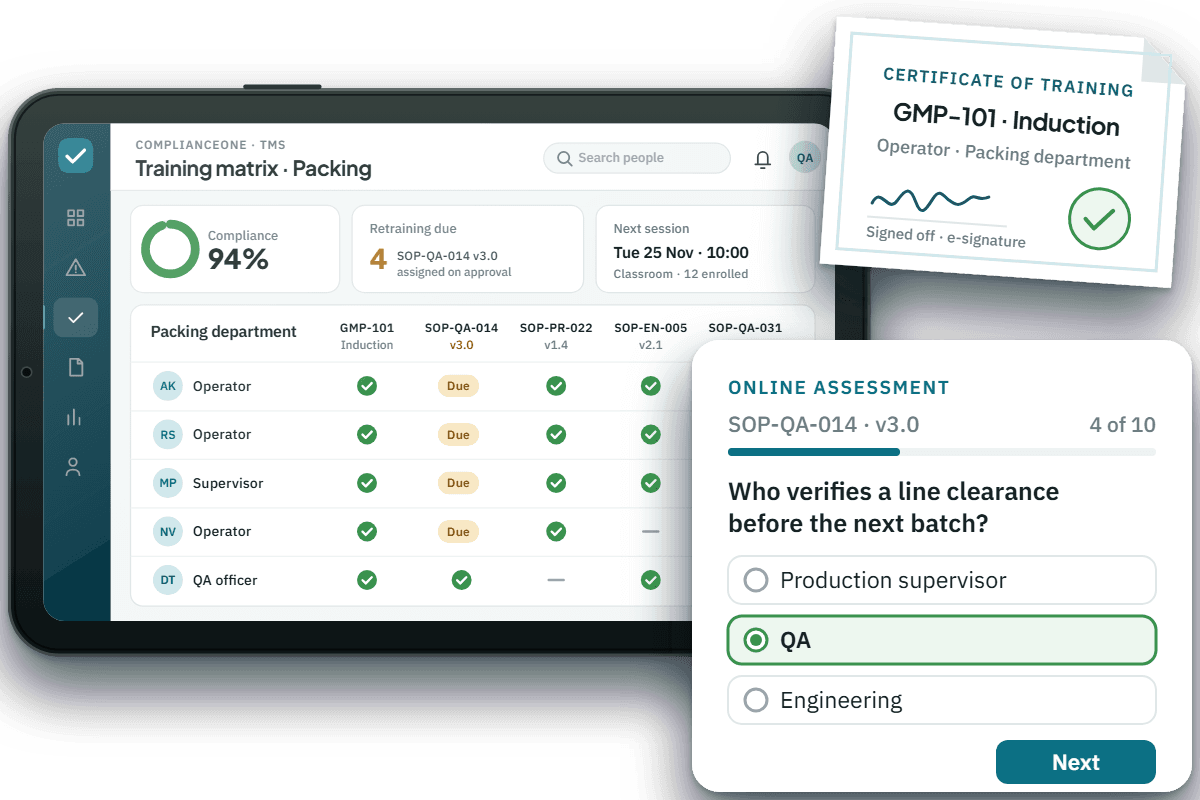
Overview
Proving people are trained, not just that they attended
GMP expects everyone to be trained on the procedures they follow before they follow them, and retrained when those procedures change. That is simple to state and hard to prove: a busy site revises SOPs constantly, and each revision affects a different group of people.
Training records on paper or in spreadsheets tend to fall behind. A new SOP version goes live, the training matrix is not updated, and an inspector later finds an operator working to a procedure they were never trained on. GAMP TMS closes that gap by taking its instructions from DMS: when a document is approved, training on it is assigned to the roles that work to it.
Was this operator trained on the version they work to?
In GAMP TMS:
- SOP approved: A new or revised document
- Assigned: To the roles that work to it
- Trained: Sessions scheduled, attendance tracked
- Assessed: Online assessment or on-the-job training
- Signed off: Competence recorded by e-signature
The next SOP revision retrains the people it affects
Why GAMP
Why teams choose GAMP TMS
From induction to competence
Onboarding is digitised and course codes are managed by role and department, so what someone must be trained on follows from what they do.
GAMP TMS · in this workflow
- Digitised onboarding and induction
- Course code management by role and department
A document change retrains the people it affects
Training syncs with approved documents automatically. When an SOP changes, the people who work to it are scheduled, and attendance is tracked.
GAMP TMS · in this workflow
- Auto-sync with approved documents
- Session scheduling with attendance tracking
Prove competence, not attendance
Online assessments and on-the-job training signed electronically, so the record shows someone can do the task rather than that they sat in the room.
GAMP TMS · in this workflow
- Online assessments and competency tracking
- On-the-job training with e-signatures
Where it sits
One module of ComplianceOne
Every ComplianceOne module is integrated — single sign-on, one administration layer and closed-loop compliance — so a record made here can reference records made next door.
ComplianceOne · 4 modules
You are here
System AdministratorCORE
The layer under every ComplianceOne module, and under the rest of the suite too.
- 21 CFR Part 11
- EU Annex 11
- EU Annex 1
- GAMP 5
- ALCOA++
- WHO GDP
- GMP
- ISO/IEC 17025
Benefits
What GAMP TMS gives you
Across ComplianceOne
Closed-loop compliance
A deviation, the CAPA it raises and the retraining that follows all reference each other. Nothing is re-keyed into a second system, and nothing has to be joined up later.
Administered once
Users, plants, departments and password policy for QMS, DMS, TMS and UAM are managed in one place, and so is any module added later.
Training that keeps up
Retraining is assigned from the document approval itself, so the training matrix is never a revision behind.
Competence on record
An online assessment shows someone understood the procedure; attendance alone shows only that they were present.
Set by the job from day one
A new starter’s first courses come from their role and department, beginning with an induction completed in the system.
Attendance without the sign-in sheet
Sessions are scheduled in the system and attendance is tracked against them, not collected on paper.
Gaps found before an inspector does
Competency is tracked person by person, so a gap shows before someone works to a procedure they were not trained on.
Practical skills signed for
On-the-job training is recorded and signed electronically where the work is done.
FAQs
Questions teams ask before they start
Does retraining really happen automatically when an SOP is revised?
Yes. When a revised document is approved in DMS, TMS assigns training on it to the roles and departments linked to that document.
Can we run classroom, online and on-the-job training?
Yes. Classroom sessions are scheduled with attendance tracking, understanding is checked with online assessments, and on-the-job training is signed off electronically by the trainer.
Can managers see who is overdue on training?
Yes. Outstanding and overdue training is visible by person, department and document, so gaps are found before an auditor finds them.
Can we import historical training records?
Yes. Existing training records are migrated during implementation, so each person’s history starts complete.
Is it compliant with 21 CFR Part 11 and EU Annex 11?
It provides the technical controls both regulations require: unique logins, a secure computer-generated audit trail on every action, e-signatures that record who signed, when and what the signature means, and role-based access on every record. Compliance also depends on how the system is validated and used at your site.
Which regulations and standards is it built against?
EU Annex 11 and 21 CFR Part 11 for electronic records and signatures; GMP, including EU GMP Annex 1 for sterile manufacture; WHO GDP for storage and distribution; GAMP 5 for the validation approach; ALCOA++ for data integrity; and ISO/IEC 17025 for calibration.
Where can it be deployed?
In the cloud, on-premises or as a hybrid. In the cloud, GAMP hosts, patches and monitors it. On-premises, it runs inside your own data centre. A hybrid splits application and data to match your residency policy.
Who manages users and access?
Your IT team does, through System Administrator: users, plants, departments and designations, module access per user, the role a user holds in each module, and password policy, all set once for the whole suite.
Can we see it against our own process?
Yes. Bring the workflow you run today and we will walk the modules through it, rather than through a scripted demo, and be straight about what would need to change on both sides.
Does it extend to modules added later?
Yes. The administration layer extends automatically to every module added to the suite.