
Quality Management System
Deviations, CAPA, change control, audits, and risk in a closed loop — every quality event connected, investigated, and closed.
Download the QMS product sheet (PDF, 159 KB)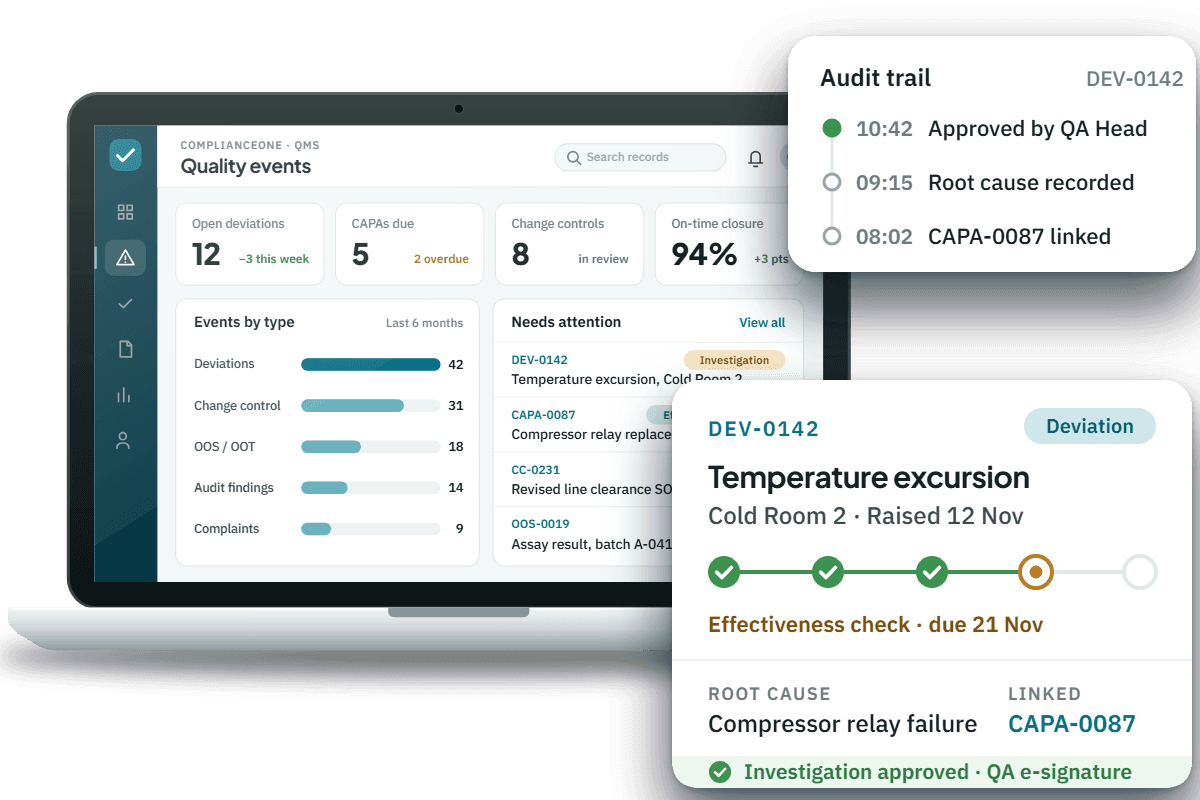
Overview
What is a QMS, and why move it off paper?
A quality management system is how a manufacturer deals with things that go wrong, things that need to change, and the checks that stop problems reaching patients. In pharma that means deviations, corrective and preventive actions (CAPA), change controls, audits, out-of-specification results, market complaints and supplier oversight.
On paper, each of these is a separate form with its own number and file. Finding out whether a deviation led to a CAPA, and whether that CAPA was ever checked, means pulling several files and hoping the numbers were copied correctly. Inspectors know this, which is why they often ask for exactly that trail.
GAMP QMS keeps every quality event in one system, linked to the events around it. Open a record and you can see what caused it, what it caused, and who signed each step and when.
Did that deviation lead to a CAPA — and was it ever checked?
In GAMP QMS:
- Raised: A deviation, complaint or out-of-specification result
- Investigated: Root cause analysis, on the record
- CAPA: Corrective and preventive action, attached to the event
- Effectiveness check: Did the action actually work?
- Closed: Only once the check passes
Every quality event closes its own loop
Why GAMP
Why teams choose GAMP QMS
Close the loop on every event
A deviation is raised, investigated and closed in one place, and the CAPA it triggers is attached to it — including the check that the action actually worked.
GAMP QMS · in this workflow
- Deviation handling with root cause analysis
- CAPA with effectiveness checks
Control what changes
Change control with impact assessment, and audits handled in the same system, so a change and the audit that examines it are never separate records.
GAMP QMS · in this workflow
- Change control and impact assessment
- Internal and external audit management
See risk before it becomes a finding
Risk assessment, out-of-specification and out-of-trend results, complaints and vendor oversight in one view of where quality is exposed.
GAMP QMS · in this workflow
- Risk assessment, OOS/OOT, market complaints
- Vendor qualification and oversight
Where it sits
One module of ComplianceOne
Every ComplianceOne module is integrated — single sign-on, one administration layer and closed-loop compliance — so a record made here can reference records made next door.
ComplianceOne · 4 modules
You are here
System AdministratorCORE
The layer under every ComplianceOne module, and under the rest of the suite too.
- 21 CFR Part 11
- EU Annex 11
- EU Annex 1
- GAMP 5
- ALCOA++
- WHO GDP
- GMP
- ISO/IEC 17025
Benefits
What GAMP QMS gives you
Across ComplianceOne
Closed-loop compliance
A deviation, the CAPA it raises and the retraining that follows all reference each other. Nothing is re-keyed into a second system, and nothing has to be joined up later.
Administered once
Users, plants, departments and password policy for QMS, DMS, TMS and UAM are managed in one place, and so is any module added later.
Investigations that finish
Root cause, the CAPA it leads to and the check that the action worked sit on one record, so an event closes only when the fix has been shown to work.
The trail an inspector asks for
Deviations, CAPA, change controls and audits live in one system, so following an event from cause to effect is a search rather than a file hunt.
Exposure you can see
Risk assessments, out-of-specification and out-of-trend results and market complaints in one view show where quality is exposed before it becomes a finding.
Changes weighed before they’re made
Change control carries its impact assessment, so a change is understood before it reaches the floor.
Audits that lead somewhere
Internal and external audits are managed in the same system as the CAPA their findings raise.
Suppliers held to the same standard
Vendor qualification and oversight sit beside your own quality events, so a supplier’s record is part of the picture.
FAQs
Questions teams ask before they start
How are quality events connected?
Deviations, CAPA, change control, audits and risk sit in a closed loop, so every quality event is connected, investigated and closed. CAPA includes effectiveness checks and deviations include root cause analysis.
Can one deviation lead to more than one CAPA?
Yes. A deviation can raise several CAPAs, and a single CAPA can be linked to several deviations when they share a root cause.
How do you measure whether a CAPA worked?
When the CAPA is raised, you define what success looks like — for example, no repeat of the deviation in six months. The effectiveness check is scheduled as part of the CAPA and must be signed off before it closes.
Does the QMS handle OOS investigations in phases?
Yes. Out-of-specification results follow a phased investigation, starting with a laboratory check and moving to a full investigation where needed, before the batch decision.
Can workflows match our existing SOPs?
Yes. Forms, approval steps and classifications are configured during implementation to match how your site already works.
Is it compliant with 21 CFR Part 11 and EU Annex 11?
It provides the technical controls both regulations require: unique logins, a secure computer-generated audit trail on every action, e-signatures that record who signed, when and what the signature means, and role-based access on every record. Compliance also depends on how the system is validated and used at your site.
Which regulations and standards is it built against?
EU Annex 11 and 21 CFR Part 11 for electronic records and signatures; GMP, including EU GMP Annex 1 for sterile manufacture; WHO GDP for storage and distribution; GAMP 5 for the validation approach; ALCOA++ for data integrity; and ISO/IEC 17025 for calibration.
Where can it be deployed?
In the cloud, on-premises or as a hybrid. In the cloud, GAMP hosts, patches and monitors it. On-premises, it runs inside your own data centre. A hybrid splits application and data to match your residency policy.
Who manages users and access?
Your IT team does, through System Administrator: users, plants, departments and designations, module access per user, the role a user holds in each module, and password policy, all set once for the whole suite.
Can we see it against our own process?
Yes. Bring the workflow you run today and we will walk the modules through it, rather than through a scripted demo, and be straight about what would need to change on both sides.
Does it extend to modules added later?
Yes. The administration layer extends automatically to every module added to the suite.