
User Access Management
Replaces the paper access-request form. Creation, modification, deactivation, password reset and account recovery for users of your systems, instruments and equipment — every request routed, approved and recorded.
Download the UAM product sheet (PDF, 154 KB)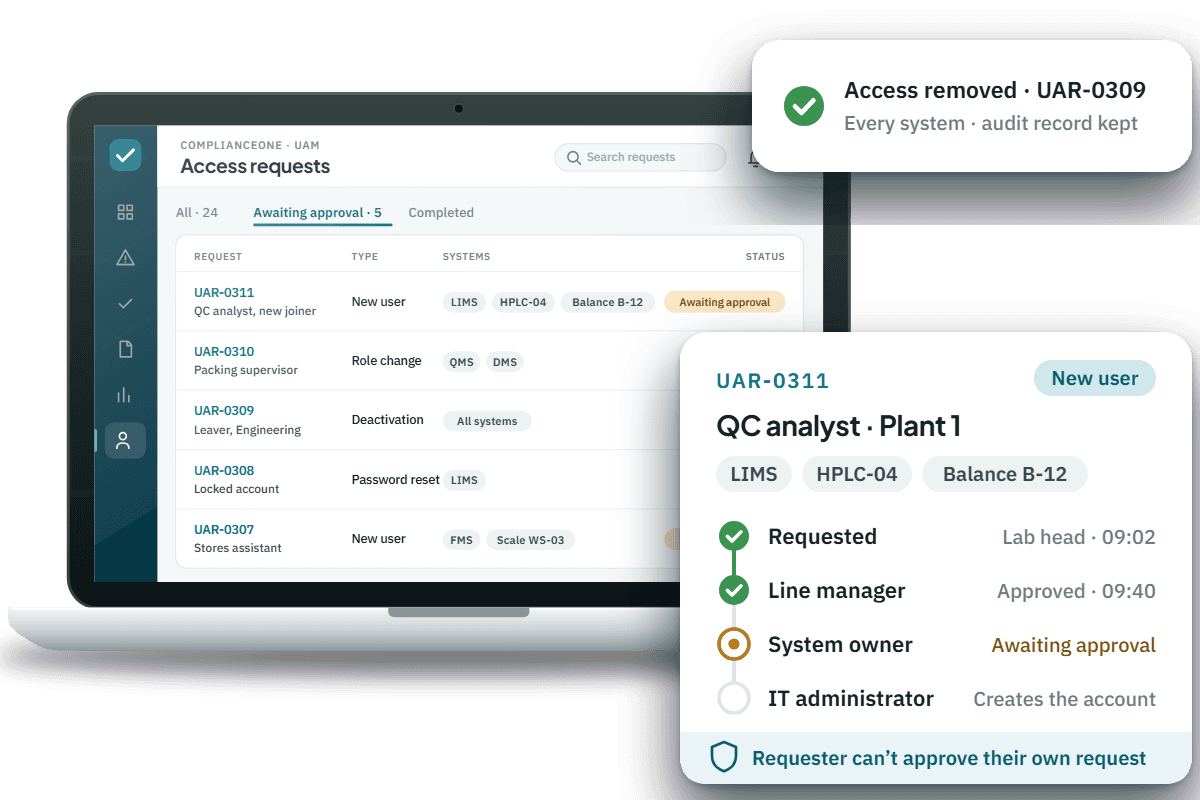
Overview
Access control is a data integrity question
A pharma site runs many computerised systems, from chromatography software and balances to LIMS and ERP, and each keeps its own user list. Regulators expect every account to belong to a named person, to carry only the rights that person needs, and to be removed when they leave.
Shared logins, leavers with active accounts and analysts who can both run and delete results are among the most common data integrity findings, and most start with a paper access form nobody followed up. GAMP UAM turns that form into a routed, recorded request, one system at a time or several at once.
Who approved this account — and does it still need to exist?
In GAMP UAM:
- Requested: One form, for one system or several
- Routed: To the approvers each system needs
- Approved: With segregation of duties enforced
- Recorded: Who asked, who approved, and when
- Changed or removed: Role changes and deactivation, by the same route
Why GAMP
Why teams choose GAMP UAM
One request, every system
An account on any system, instrument or piece of equipment starts from one request, and one submission can cover several of them at once.
GAMP UAM · in this workflow
- Digitised user creation for any system, instrument or equipment
- One submission covering requests across multiple systems
Change and remove access with the same rigour
Role changes are routed for approval like any other request, and deactivation leaves a complete audit record rather than a deleted account.
GAMP UAM · in this workflow
- Access modification — role changes routed for approval
- User deactivation with a complete audit record
Recovery without a side channel
Password reset and account recovery run through the same routed, recorded process — with segregation of duties and access rights enforced throughout.
GAMP UAM · in this workflow
- Password reset and account recovery requests
- Segregation of duties and access rights enforced for data integrity
Where it sits
One module of ComplianceOne
Every ComplianceOne module is integrated — single sign-on, one administration layer and closed-loop compliance — so a record made here can reference records made next door.
ComplianceOne · 4 modules
You are here
System AdministratorCORE
The layer under every ComplianceOne module, and under the rest of the suite too.
- 21 CFR Part 11
- EU Annex 11
- EU Annex 1
- GAMP 5
- ALCOA++
- WHO GDP
- GMP
- ISO/IEC 17025
Benefits
What GAMP UAM gives you
Across ComplianceOne
Closed-loop compliance
A deviation, the CAPA it raises and the retraining that follows all reference each other. Nothing is re-keyed into a second system, and nothing has to be joined up later.
Administered once
Users, plants, departments and password policy for QMS, DMS, TMS and UAM are managed in one place, and so is any module added later.
No account without an owner
Every account on every system starts from a routed, approved request, so each one belongs to a named person with a recorded reason.
Leavers leave every system
Deactivation runs through the same route and leaves a complete record, instead of depending on someone remembering each system.
Duties kept apart
Segregation of duties is enforced, closing off the run-and-delete combinations inspectors look for.
One form, many systems
A single submission covers access to several systems, instruments or pieces of equipment at once.
Role changes on the record
Changing someone’s access goes through the same approval route as granting it in the first place.
Password resets on the record
Password resets and account recovery are requested and recorded like any other access change.
FAQs
Questions teams ask before they start
Does it replace the paper access-request form?
Yes. Every kind of access request, from a new account to a password reset, is made and approved in the system instead of on paper, and one submission can cover several systems at once.
Does UAM cover standalone instruments without a network login?
Yes. UAM manages the request, approval and record for any system, instrument or equipment, including standalone ones where the account is created locally.
What happens when an employee resigns?
A deactivation request covers every system the person had access to, and each system owner confirms removal. The full history is kept for inspection.
How does it support segregation of duties?
Access rights are defined per role and checked against segregation-of-duties rules before approval, so conflicting rights are caught before they are granted.
Does UAM replace System Administrator?
No. System Administrator manages users of the GAMP suite itself. UAM manages access to all your other GxP systems, instruments and equipment.
Is it compliant with 21 CFR Part 11 and EU Annex 11?
It provides the technical controls both regulations require: unique logins, a secure computer-generated audit trail on every action, e-signatures that record who signed, when and what the signature means, and role-based access on every record. Compliance also depends on how the system is validated and used at your site.
Which regulations and standards is it built against?
EU Annex 11 and 21 CFR Part 11 for electronic records and signatures; GMP, including EU GMP Annex 1 for sterile manufacture; WHO GDP for storage and distribution; GAMP 5 for the validation approach; ALCOA++ for data integrity; and ISO/IEC 17025 for calibration.
Where can it be deployed?
In the cloud, on-premises or as a hybrid. In the cloud, GAMP hosts, patches and monitors it. On-premises, it runs inside your own data centre. A hybrid splits application and data to match your residency policy.
Who manages users and access?
Your IT team does, through System Administrator: users, plants, departments and designations, module access per user, the role a user holds in each module, and password policy, all set once for the whole suite.
Can we see it against our own process?
Yes. Bring the workflow you run today and we will walk the modules through it, rather than through a scripted demo, and be straight about what would need to change on both sides.
Does it extend to modules added later?
Yes. The administration layer extends automatically to every module added to the suite.