
Facility Monitoring System
Continuous monitoring with wireless dataloggers transmitting encrypted data in real time: MQTT loggers with no gateway, or LoRaWAN loggers for large sites.
Download the FMS product sheet (PDF, 188 KB)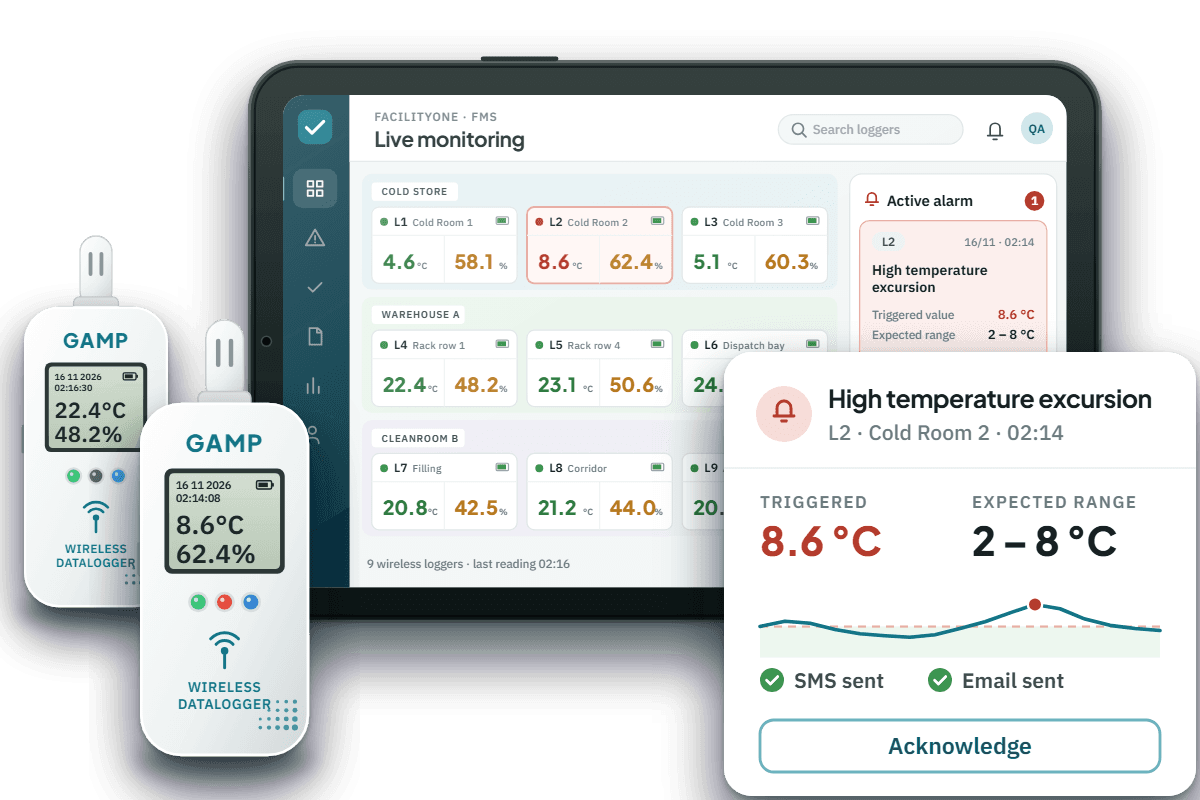
Overview
Know what your rooms are doing, all the time
Most temperature problems are not dramatic. A compressor struggles on a hot afternoon, a door is left ajar on a night shift, a power cut outlasts the UPS. What matters is how quickly someone finds out, and whether the record shows exactly what happened.
FMS puts a wireless datalogger in each critical location and brings the readings together on one live dashboard. When a reading crosses its limit, the people responsible get an SMS and an email at once, and every reading is kept with its audit trail for the next inspection.
What happened on the night shift, and when did anyone find out?
In GAMP FMS:
- Logged: A wireless datalogger in each critical location
- Live: Every reading on one dashboard
- Alarm: A reading crosses its limit
- Alerted: SMS and email to the people responsible, at once
- Reported: MKT, trend and deviation reports from the same data
Monitoring runs around the clock
Why GAMP
Why teams choose GAMP FMS
See every critical environment live
A real-time dashboard across cold rooms, cleanrooms and warehouses, with sensors from more than one manufacturer feeding it through a REST interface.
GAMP FMS · in this workflow
- Real-time dashboard with live sensor analytics
- Multi-brand sensor support via REST API
Know the moment it drifts
Threshold alarms by SMS and email as the reading crosses, and onboard storage that protects the record if the network is not there to carry it.
GAMP FMS · in this workflow
- Instant threshold alarms by SMS and email
- Offline storage protects readings if the network drops
Report without assembling it
Mean kinetic temperature, trends, deviations and compliance reports generated from the same data the alarms run on.
GAMP FMS · in this workflow
- MKT (mean kinetic temperature) reporting
- Automated trend, deviation, and compliance reports
The complete system
Loggers on the floor, the record in FMS
FMS runs on monitoring hardware from GAMP: wireless loggers in the rooms and stores you watch, and displays where people work. The software takes every reading, checks it against its limits and keeps it as the record.
1In your facility
GAMP hardware
2GAMP software
The module and its base
3What you get
From the record
Hardware · GAMP
MQTT wireless loggers
Readings sent over your network in real time, with no gateway.
How it connects
Already have an environmental monitoring system? FMS can also take its data points.
Hardware is supplied by GAMP Services Limited, our parent company. Buy the software on its own or as the complete system through us; hardware on its own through GAMP Services Limited.
Where it sits
One module of FacilityOne
FacilityOne’s modules share single sign-on and one administration layer, and readings, studies and samples can be linked across them.
FacilityOne · 3 modules
You are here
System AdministratorCORE
The layer under every FacilityOne module, and under the rest of the suite too.
- 21 CFR Part 11
- EU Annex 11
- EU Annex 1
- GAMP 5
- ALCOA++
- WHO GDP
- GMP
- ISO/IEC 17025
Benefits
What GAMP FMS gives you
Across FacilityOne
Every controlled space in one place
Monitoring, mapping and microbial air sampling run on one platform with one administration layer, so every room, chamber and cleanroom is managed in the same place.
Continuous, not periodic
Conditions are proven around the clock rather than at whatever moment somebody happened to take a reading.
Know as it happens
Alarms by SMS and email reach the people responsible the moment a reading crosses its limit, not at the next round.
Reports without the spreadsheet
Trend, deviation and compliance reports come straight out of the system, so nobody exports readings to build them.
Works with the sensors you have
Sensors from more than one manufacturer feed the same dashboard through a REST interface.
Every room on one screen
A live dashboard shows every monitored location at once, with its current reading.
No gap when the network drops
Readings are stored on the logger if the connection fails, so the record stays complete.
Mean kinetic temperature, calculated
MKT is calculated and reported by the system rather than worked out by hand.
FAQs
Questions teams ask before they start
What if the network drops?
Each datalogger keeps recording on board and sends the stored readings when the connection returns, so the record has no gap.
Who receives temperature alarms?
You decide, per location. Limits are set for each monitored space, and alarms go by SMS and email to the people responsible for that area the moment a reading crosses them.
How is mean kinetic temperature (MKT) calculated?
FMS applies the standard mean kinetic temperature formula to the logged readings over the period you select. MKT condenses a fluctuating temperature history into the single temperature that would cause the same thermal stress. Read against the product’s stability data, it informs the impact assessment of an excursion rather than deciding it on its own.
Is the monitoring data secure?
Readings are encrypted in transit and stored with an audit trail built for 21 CFR Part 11 and EU Annex 11.
Is it compliant with 21 CFR Part 11 and EU Annex 11?
It provides the technical controls both regulations require: unique logins, a secure computer-generated audit trail on every action, e-signatures that record who signed, when and what the signature means, and role-based access on every record. Compliance also depends on how the system is validated and used at your site.
Which regulations and standards is it built against?
EU Annex 11 and 21 CFR Part 11 for electronic records and signatures; GMP, including EU GMP Annex 1 for sterile manufacture; WHO GDP for storage and distribution; GAMP 5 for the validation approach; ALCOA++ for data integrity; and ISO/IEC 17025 for calibration.
Where can it be deployed?
In the cloud, on-premises or as a hybrid. In the cloud, GAMP hosts, patches and monitors it. On-premises, it runs inside your own data centre. A hybrid splits application and data to match your residency policy.
Who manages users and access?
Your IT team does, through System Administrator: users, plants, departments and designations, module access per user, the role a user holds in each module, and password policy, all set once for the whole suite.
Can we see it against our own process?
Yes. Bring the workflow you run today and we will walk the modules through it, rather than through a scripted demo, and be straight about what would need to change on both sides.
Does it extend to modules added later?
Yes. The administration layer extends automatically to every module added to the suite.